
Residents get a permit in 60 seconds. Your department sees every one.
They register, pay and renew online, at 2am if that’s when they think of it — no phone call, no form to key in, no cheque to chase. Every permit lands on your map the moment it’s issued, so when a call comes in you already know whether it’s a burn you approved. And when the wind turns on a Friday afternoon, one click texts and emails every permit holder that the ban is on — including the ones driving north right now.
- Built for fire departments
- Live in days
- Configured to your by-law
How one permit moves through the system
- 2:14am — A resident applies from the couch. Address, permit type, dates. No phone call to a hall that closed at five.
- 2:14am — Paid, issued, emailed. The fee settles to the municipality’s account. Nobody keys anything in.
- 2:14am — It’s on your map. Address, type and dates, visible to every officer with a login.
- 7:40am — A smoke call comes in. The crew already knows whether it’s a burn you approved.
The permit then appears on the department’s live map alongside every other permitted burn in the township, with its address, type and dates.
For residents
Looking for a burn permit yourself?Find your municipality for today’s fire danger, your by-law, and where to apply.Find your town →
What changes, in numbers
- Under sixty seconds for a resident to get a permit
- No hours of staff time to issue one
- One click to suspend every active permit
- Days to go live, not weeks
Trusted by departments in Canada & the US
- Town of Cochrane
- Town of Lincoln
- Township of West Lincoln
- Municipality of Whitestone
- Town of Parry Sound
- Port Sanilac F.D.
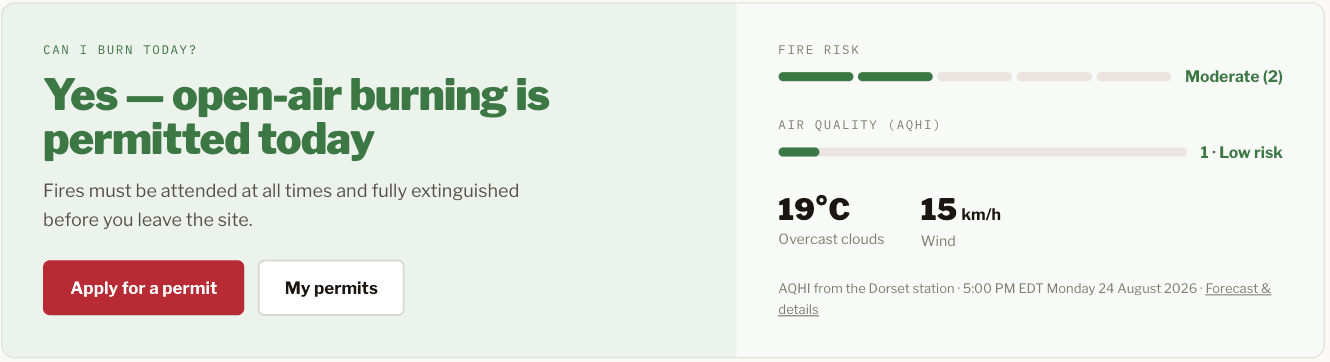
What a resident sees
Three reasons departments move off paper
What changes isn’t the by-law. It’s who does the work, how much of the burning you can see, and how much of the fee you actually collect.
- 01 / AWARENESS
Every burn, on one map
Each permit appears the moment it's issued, with the address, the type and the dates. When a smoke call comes in, the question is whether it's a burn you already know about — and now that's answerable in a second.
- 02 / COMPLIANCE
Make it easy to comply, and more people do
Most unpermitted burning isn't defiance, it's a phone call nobody made. When a permit takes sixty seconds at any hour, more residents get one — and every resident who complies is a fire you knew about in advance.
- 03 / REVENUE
The case you take to council
Residents pay by card and fees land directly in your account — fewer cash transactions, fewer reconciliations, less municipal risk. The permits you were never collecting on are the ones that move the number.
Everything a modern burn-permit program needs
Real-time burn map
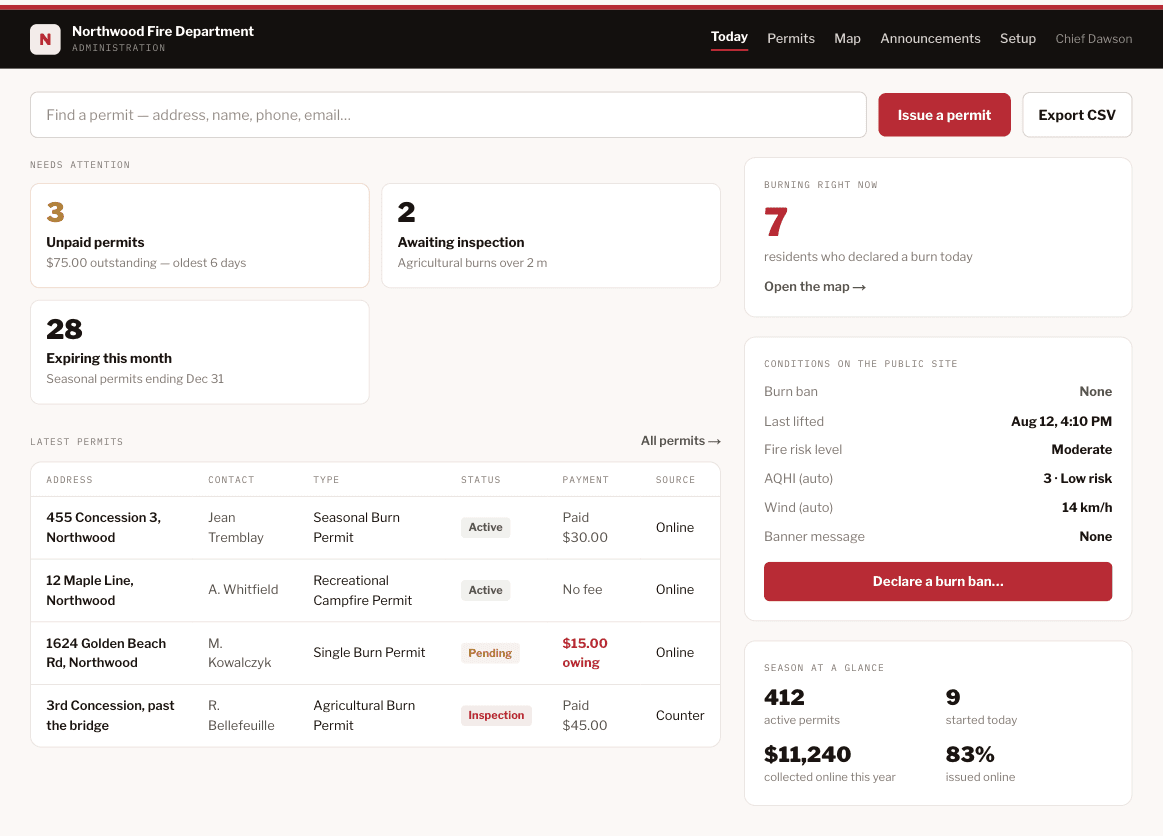
Every permitted burn at a glance, with address, type and dates — the first thing to check when a smoke call comes in.
One-click burn ban
Declare a ban or an advisory once. Every permit holder is texted and emailed, the public page flips, and burning is suspended — in a single click.
An advisory before anyone calls you
Live sustained wind and the Air Quality Health Index from Environment Canada, against the thresholds in your own by-law — so an advisory is caught before anyone calls you.
24/7 online availability
Residents register, pay, and renew any time — no office hours, no paperwork.
Payments direct to you
Secure card payments deposited straight to your department's bank account.
Multiple permit types
Recreational, brush, farm — free or paid. Configure it to match your bylaws.
Embed or stand alone
Drop it into your current website, or we host a branded site for you.
The four parts of FirePermit.Online
One connected system for residents, your office, and your responders.
Web portal
The public-facing front door — residents apply and pay in under a minute.
Notifications
Broadcast burn bans and risk changes to every holder, instantly.
Admin portal
Full control — add permits manually, take cash entries, adjust settings.
Real-time map
Live permit status that helps responders downgrade to a known burn.
The department dashboard
The chief wants it. The clerk has to sign it.
Different questions, and they arrive as a questionnaire three weeks after everyone agreed. Ours are answered in advance — data ownership, security, and the accessibility standard your portal is legally held to, with the privacy assessment handed over already drafted.
Data ownership & exit
The permit record is the municipality’s record. Exportable any time, at no charge.
Privacy assessment
Whatever your review is called, the vendor half is already written. Mandatory in Ontario from 1 January 2027.
Accessibility
WCAG 2.1 AA — ADA Title II and the Ontario standard both. Tested every release, known issues published.
Security answers
Access, isolation, sub-processors and incident handling, in questionnaire order.
Ready to modernize your burn permits?
Live in days, not weeks. No cost to start.